Welcome to the ultimate guide on Azure Active Directory! Whether you’re an IT pro or just starting out, this article breaks down everything you need to know about Microsoft’s cloud identity solution in a clear, engaging way.




What Is Azure Active Directory and Why It Matters

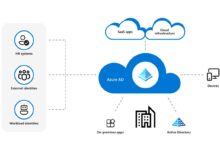
Azure Active Directory (Azure AD) is Microsoft’s cloud-based identity and access management service. It enables organizations to securely manage user identities, control access to applications, and enforce security policies across hybrid and cloud environments. Unlike traditional on-premises Active Directory, Azure AD is built for the modern, mobile-first, cloud-first world.
Core Definition and Purpose
Azure Active Directory is not just a cloud version of Windows Server Active Directory—it’s a fundamentally different platform designed for scalability, global reach, and integration with SaaS applications. Its primary purpose is to provide single sign-on (SSO), multi-factor authentication (MFA), and identity governance across Microsoft 365, Azure, and thousands of third-party apps.
- Centralized identity management for cloud and hybrid environments
- Enables secure access to internal and external applications
- Supports modern authentication protocols like OAuth 2.0, OpenID Connect, and SAML
According to Microsoft, over 1.4 billion identities are managed through Azure AD every month, making it one of the most widely used identity platforms globally (Microsoft Learn).
How Azure AD Differs from On-Premises AD
While both systems manage identities, their architecture and use cases differ significantly. Traditional Active Directory is hierarchical, domain-based, and relies heavily on Group Policy and LDAP. Azure AD, on the other hand, is flat, REST API-driven, and optimized for web-based authentication.
- On-prem AD uses domains, trees, and forests; Azure AD uses tenants
- Azure AD supports social identity providers (Google, Facebook) via B2C
- No native support for Group Policy in Azure AD—replaced by Intune and Conditional Access
Azure AD isn’t a replacement for on-prem AD—it’s a complement that extends identity to the cloud.
Key Features of Azure Active Directory
Azure Active Directory offers a robust set of features that empower organizations to manage identities at scale while maintaining high security standards. These capabilities are grouped into four main editions: Free, Office 365 Apps, Premium P1, and Premium P2.
Single Sign-On (SSO) Across Applications
One of the most powerful features of Azure AD is its ability to provide seamless access to thousands of pre-integrated SaaS applications. Users can log in once and gain access to all authorized apps without re-entering credentials.
- Pre-integrated apps include Salesforce, Dropbox, Workday, and Zoom
- Custom apps can be added using SAML, OAuth, or password-based SSO
- Users access apps via the My Apps portal or Microsoft Start
This reduces password fatigue and improves productivity. For example, a sales team using Salesforce, Office 365, and HubSpot can access all three with one login, managed entirely through Azure AD.
Multi-Factor Authentication (MFA)
Security is a top priority, and Azure AD’s MFA adds an extra layer of protection by requiring users to verify their identity using at least two methods. This dramatically reduces the risk of account compromise.
- Available methods: phone call, text message, Microsoft Authenticator app, FIDO2 security keys
- Can be enforced based on user, location, device, or application sensitivity
- Available in all editions, but policy granularity increases with Premium licenses
Microsoft reports that MFA blocks over 99.9% of account compromise attacks (Microsoft Security), making it one of the most effective security controls available.
Understanding Azure AD Licensing Tiers
Choosing the right Azure AD edition is crucial for balancing cost, functionality, and security needs. The platform offers four main tiers, each unlocking progressively advanced features.
Azure AD Free Edition
The Free edition is included with any subscription to Microsoft 365 or Azure. It provides basic identity and access management capabilities suitable for small businesses or departments.
- Supports up to 50,000 objects (users, groups, contacts)
- Basic SSO for SaaS apps
- Limited reporting and monitoring
While sufficient for basic needs, it lacks advanced security and automation features required by larger organizations.
azure active directory – Azure active directory menjadi aspek penting yang dibahas di sini.
Premium P1 and P2: Advanced Identity Management
Azure AD Premium P1 and P2 are designed for enterprises needing robust identity governance, risk detection, and automation.
- Premium P1 includes Conditional Access, Identity Protection (basic), and Self-Service Password Reset (SSPR)
- Premium P2 adds Identity Protection (risk-based policies), Access Reviews, and Privileged Identity Management (PIM)
- Both require Azure AD Premium licenses and are billed per user/month
For instance, a financial institution might use P2 to enforce MFA for all remote logins and automatically revoke access if suspicious activity is detected.
Investing in Azure AD Premium can reduce identity-related breaches by up to 90%, according to industry case studies.
How Azure Active Directory Enables Hybrid Identity
Most organizations operate in a hybrid environment—using both on-premises infrastructure and cloud services. Azure AD plays a critical role in bridging these worlds through seamless identity synchronization and authentication methods.
Azure AD Connect: Syncing On-Premises AD to the Cloud
Azure AD Connect is the primary tool for synchronizing user identities from on-premises Active Directory to Azure AD. It ensures that users have a consistent identity across environments.
- Installs on a Windows Server and connects to on-prem AD and Azure AD
- Synchronizes user accounts, groups, and passwords
- Supports filtering, attribute flow customization, and staging mode
Once configured, users can sign in to cloud apps using their corporate credentials, improving user experience and reducing helpdesk calls for password resets.
Authentication Methods in Hybrid Scenarios
Organizations can choose from several authentication methods when implementing hybrid identity:
- Password Hash Synchronization (PHS): Syncs password hashes to Azure AD for cloud authentication
- Pass-Through Authentication (PTA): Validates credentials against on-prem AD in real time
- Federation (AD FS): Uses on-premises ADFS servers for SSO to cloud apps
PTA is often preferred for its simplicity and reliability, eliminating the need for additional ADFS infrastructure while maintaining on-prem control over authentication.
Security and Risk Management with Azure AD
In today’s threat landscape, identity is the new perimeter. Azure Active Directory provides advanced tools to detect, respond to, and prevent identity-based attacks.
Identity Protection and Risk-Based Policies
Azure AD Identity Protection uses machine learning to detect risky sign-ins and compromised users. It assigns risk levels (low, medium, high) based on factors like anonymous IP addresses, unfamiliar locations, or leaked credentials.
- Can trigger automated responses like requiring MFA or blocking access
- Integrates with Conditional Access policies to enforce remediation
- Available in Azure AD Premium P2
For example, if a user logs in from Nigeria and then from Canada within minutes, Identity Protection flags this as an impossible travel event and can automatically require MFA or block the session.
Conditional Access: The Heart of Zero Trust
Conditional Access is a core component of Microsoft’s Zero Trust security model. It allows administrators to create policies that enforce access controls based on specific conditions.
- Conditions include user, device, location, application, and risk level
- Access controls can require MFA, compliant devices, or approved apps
- Policies are evaluated in real time during sign-in attempts
A common policy might state: ‘Require MFA for all users accessing Exchange Online from outside the corporate network.’ This ensures that even if credentials are stolen, attackers can’t access email without the second factor.
Conditional Access policies are the cornerstone of modern identity security—simple to define, powerful in execution.
User Lifecycle Management and Governance
Effective identity governance ensures that users have the right access at the right time—and that access is revoked when no longer needed. Azure Active Directory provides tools to automate and audit the entire user lifecycle.
azure active directory – Azure active directory menjadi aspek penting yang dibahas di sini.
Self-Service Password Reset (SSPR)
SSPR empowers users to reset their passwords or unlock accounts without contacting IT. This reduces helpdesk workload and improves productivity.
- Users register with multiple verification methods (email, phone, authenticator app)
- Available in Free edition with limited methods; more options in Premium
- Can be combined with MFA for added security
Studies show that SSPR can reduce password-related helpdesk tickets by up to 40%, freeing IT staff for higher-value tasks.
Access Reviews and Privileged Identity Management (PIM)
Access Reviews allow administrators to periodically review and approve user access to apps and groups. PIM provides just-in-time (JIT) access for privileged roles like Global Administrator.
- PIM requires users to request and justify elevated access
- Privileged sessions are time-limited and audited
- Reduces the risk of standing privileges being abused
For example, a database administrator might need Global Admin rights for 2 hours to perform a migration. PIM allows them to activate the role temporarily, with full audit logging.
Extending Azure AD with B2B and B2C Scenarios
Beyond internal identity management, Azure Active Directory supports external collaboration and customer-facing applications through B2B and B2C capabilities.
Azure AD B2B: Secure Collaboration with Partners
Azure AD B2B allows organizations to invite external users (from partners, vendors, or customers) to access internal applications and resources securely.
- Guest users sign in with their own work or personal accounts
- Admins control access via Conditional Access and MFA policies
- Usage is free—guest users don’t require Azure AD licenses
For example, a marketing agency can collaborate with a client by granting access to a shared SharePoint site or Power BI dashboard without creating local accounts.
Azure AD B2C: Customer Identity Management
Azure AD B2C is designed for businesses that need to manage millions of consumer identities. It’s ideal for customer-facing apps like e-commerce, healthcare portals, or media platforms.
- Supports social logins (Google, Facebook, Apple)
- Customizable user journeys and branding
- Highly scalable and globally available
Unlike standard Azure AD, B2C is billed based on monthly active users and requires a separate tenant. It’s not meant for employee identity management but excels in consumer scenarios.
Best Practices for Managing Azure Active Directory
Deploying Azure AD is just the beginning. To maximize security, efficiency, and user experience, organizations should follow proven best practices.
Implement Role-Based Access Control (RBAC)
Assign administrative roles based on the principle of least privilege. Avoid giving Global Administrator access unless absolutely necessary.
- Use built-in roles like Helpdesk Administrator, Billing Administrator, or Service Support Administrator
- Leverage PIM to grant temporary elevated access
- Regularly audit role assignments
This minimizes the attack surface and ensures accountability.
Enable Logging and Monitoring
Use Azure AD’s built-in reporting and integrate with Microsoft Sentinel for advanced threat detection.
azure active directory – Azure active directory menjadi aspek penting yang dibahas di sini.
- Monitor sign-in logs, audit logs, and risky user activity
- Set up alerts for suspicious behavior
- Export logs to SIEM tools for correlation
Proactive monitoring helps detect breaches early and supports compliance audits.
What is Azure Active Directory used for?
Azure Active Directory is used for managing user identities, enabling single sign-on to cloud and on-premises applications, enforcing security policies like MFA, and supporting hybrid identity scenarios. It’s essential for securing access in modern IT environments.
Is Azure AD the same as Windows Active Directory?
No, Azure AD is not the same as Windows Server Active Directory. While both manage identities, Azure AD is cloud-native, API-driven, and designed for web applications and SaaS services, whereas traditional AD is on-premises, domain-based, and relies on protocols like LDAP and Kerberos.
How much does Azure Active Directory cost?
Azure AD has a Free tier included with Microsoft 365 and Azure subscriptions. Premium features require paid licenses: Azure AD Premium P1 ($6/user/month) and P2 ($9/user/month). B2C is billed per monthly active user.
Can Azure AD replace on-premises Active Directory?
Not entirely. While Azure AD can handle cloud identity and access, most organizations still rely on on-prem AD for legacy applications, Group Policy, and domain-joined devices. Azure AD complements on-prem AD through hybrid identity solutions like Azure AD Connect.
How do I get started with Azure Active Directory?
Start by creating an Azure AD tenant in the Azure portal. Then, add users, assign licenses, configure SSO for apps, and set up security policies like MFA. Use Azure AD Connect if you have on-prem AD. Microsoft provides extensive documentation and quickstart guides to help you deploy.
Azure Active Directory is a cornerstone of modern identity and access management. From securing employee access to enabling customer identity solutions, it offers a comprehensive, scalable, and secure platform. Whether you’re managing a small business or a global enterprise, understanding and leveraging Azure AD’s capabilities is essential for staying secure and productive in the cloud era. By following best practices in licensing, security, and governance, organizations can unlock the full potential of their digital identity strategy.
azure active directory – Azure active directory menjadi aspek penting yang dibahas di sini.
Recommended for you 👇
Further Reading: