Windows Azure AD isn’t just another cloud tool—it’s the backbone of modern identity management. Whether you’re securing remote teams or streamlining app access, this platform delivers unmatched control and scalability. Let’s dive into what makes it a game-changer.




What Is Windows Azure AD and Why It Matters

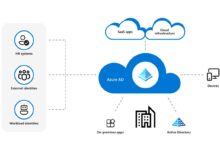
Windows Azure AD, officially known as Microsoft Entra ID (formerly Azure Active Directory), is Microsoft’s cloud-based identity and access management service. It enables organizations to securely manage user identities, control access to applications, and enforce policies across hybrid and cloud environments. Unlike traditional on-premises Active Directory, Windows Azure AD is built for the cloud-first world, supporting modern authentication protocols like OAuth 2.0, OpenID Connect, and SAML.
Core Purpose of Windows Azure AD
The primary goal of Windows Azure AD is to provide a centralized identity platform that bridges on-premises infrastructure with cloud services. It allows users to sign in once and access multiple applications—both Microsoft and third-party—without re-entering credentials. This single sign-on (SSO) capability reduces password fatigue and improves productivity.
- Centralized user identity management
- Secure access to cloud and on-prem apps
- Integration with Microsoft 365, Dynamics 365, and thousands of SaaS apps
According to Microsoft, over 1.4 billion identities are protected by Azure AD daily, making it one of the most widely used identity platforms globally (Microsoft Learn).
Differences Between On-Prem AD and Windows Azure AD
While both systems manage identities, they serve different architectures. Traditional Active Directory is designed for Windows networks and relies on domain controllers, Group Policy, and LDAP. In contrast, Windows Azure AD is protocol-driven, REST-based, and optimized for internet-scale applications.
- On-prem AD uses NTLM/Kerberos; Azure AD uses modern standards like OAuth
- Azure AD supports multi-factor authentication (MFA) natively
- No concept of domains or domain controllers in Azure AD
“Azure AD is not a cloud version of Active Directory—it’s a new identity system designed for the cloud era.” — Microsoft Documentation
Key Features of Windows Azure AD That Transform Security
Windows Azure AD offers a robust suite of features that go beyond basic user authentication. From conditional access to identity protection, these tools empower organizations to adopt zero-trust security models while maintaining usability.
Single Sign-On (SSO) Across Cloud and On-Premises Apps
One of the most impactful features of Windows Azure AD is its ability to enable seamless single sign-on. Users can access Microsoft 365, Salesforce, Workday, or custom line-of-business apps with one set of credentials.
- Supports over 2,600 pre-integrated SaaS applications
- Enables passwordless sign-in via FIDO2 security keys or Windows Hello
- Automated provisioning and deprovisioning of user accounts
By reducing the number of passwords users must remember, SSO significantly lowers the risk of phishing and credential theft.
Multi-Factor Authentication (MFA) for Enhanced Security
Windows Azure AD includes built-in multi-factor authentication that adds an extra layer of security during login. Users can verify their identity using phone calls, text messages, authenticator apps, or biometrics.
- Available in free, basic, and premium editions
- Can be enforced based on user risk, location, or device compliance
- Supports adaptive MFA through Conditional Access policies
According to Microsoft, enabling MFA blocks over 99.9% of account compromise attacks (Microsoft Security).
How Windows Azure AD Enables Hybrid Identity Management
For enterprises with existing on-premises infrastructure, Windows Azure AD provides seamless integration through hybrid identity solutions. This allows organizations to extend their current Active Directory to the cloud without a complete migration.
Azure AD Connect: Bridging On-Prem and Cloud
Azure AD Connect is the primary tool for synchronizing user identities from on-premises Active Directory to Windows Azure AD. It ensures that user accounts, passwords, and group memberships remain consistent across environments.
- Supports password hash synchronization, pass-through authentication, and federation
- Enables seamless SSO for hybrid users
- Can be deployed in high-availability configurations
Organizations can choose the authentication method that best fits their security and operational requirements. For example, pass-through authentication validates credentials against on-prem AD in real time, reducing reliance on synchronized password hashes.
Password Hash Synchronization vs. Pass-Through Authentication
Two common methods for hybrid authentication are password hash synchronization (PHS) and pass-through authentication (PTA). PHS copies hashed passwords from on-prem AD to Azure AD, allowing cloud authentication even if on-prem servers are down. PTA, on the other hand, forwards authentication requests to on-prem domain controllers.
- PHS offers higher availability but stores password hashes in the cloud
- PTA enhances security by never storing passwords in Azure AD
- Both support MFA and Conditional Access
The choice depends on organizational priorities: resilience (PHS) or security (PTA).
Conditional Access: The Heart of Zero Trust in Windows Azure AD
Conditional Access is one of the most powerful security features in Windows Azure AD. It allows administrators to define policies that control access based on user identity, device compliance, location, application sensitivity, and risk level.
Building Smart Access Policies
With Conditional Access, IT teams can create rules like “Require MFA when accessing financial apps from outside the corporate network” or “Block sign-ins from anonymous IP addresses.”
- Policies are evaluated in real time during authentication
- Supports integration with Microsoft Defender for Cloud Apps and Intune
- Can enforce device compliance (e.g., encrypted devices, up-to-date OS)
These policies help enforce the principle of least privilege and reduce the attack surface.
Using Risk-Based Policies with Identity Protection
Windows Azure AD Identity Protection uses machine learning to detect suspicious sign-in behaviors, such as sign-ins from unfamiliar locations or leaked credentials. When risky activity is detected, Conditional Access can automatically trigger remediation steps.
- Identifies sign-in risk levels: low, medium, high
- Can require password reset or MFA for high-risk logins
- Generates alerts for security teams
This proactive approach helps prevent breaches before they occur.
Windows Azure AD and Application Management
Managing access to applications is a core function of Windows Azure AD. It acts as an identity provider (IdP) for thousands of cloud apps and enables secure, automated user provisioning.
App Registration and Enterprise App Integration
Developers and administrators can register applications in Windows Azure AD to enable secure authentication. This includes web apps, mobile apps, and APIs.
- Supports OAuth 2.0 and OpenID Connect for secure token-based access
- Enables role-based access control (RBAC) for fine-grained permissions
- Allows custom claims and API permissions
For enterprise apps, Azure AD provides a gallery of pre-configured integrations, making setup fast and reliable.
Automated User Provisioning with SCIM
Windows Azure AD supports the System for Cross-domain Identity Management (SCIM) protocol to automate user lifecycle management. When a user is added or removed in Azure AD, their access to integrated apps is automatically updated.
- Reduces manual work for IT teams
- Minimizes orphaned accounts and security risks
- Supports just-in-time provisioning for SaaS apps
This feature is especially valuable for large organizations with dynamic workforces.
Security and Compliance in Windows Azure AD
Security isn’t an afterthought in Windows Azure AD—it’s built into every layer. From encryption to audit logging, the platform helps organizations meet regulatory requirements and defend against threats.
Identity Protection and Threat Detection
As mentioned earlier, Identity Protection analyzes sign-in data to detect anomalies. It monitors for leaked credentials, impossible travel, and other indicators of compromise.
- Integrates with Microsoft Sentinel for advanced threat hunting
- Provides risk detection history and remediation guidance
- Supports user risk policies that block or challenge risky logins
Organizations using Identity Protection report a 70% reduction in identity-related incidents (Microsoft Learn).
Audit Logs and Monitoring Capabilities
Windows Azure AD maintains detailed logs of all authentication and administrative activities. These logs are crucial for compliance audits and forensic investigations.
- Tracks user sign-ins, role assignments, and policy changes
- Data retention varies by license (7 days in free tier, up to 365 days in Premium)
- Can be exported to SIEM tools via Azure Monitor or Log Analytics
Administrators can set up alerts for suspicious activities, such as multiple failed logins or admin role changes.
Deployment and Licensing Models for Windows Azure AD
Windows Azure AD is available in four editions: Free, Office 365 apps, Azure AD P1, and Azure AD P2. Each tier offers increasing levels of functionality, especially around security and governance.
Understanding Azure AD Licensing Tiers
The Free edition includes basic identity and SSO capabilities, ideal for small businesses. The P1 and P2 tiers unlock advanced features like Conditional Access, Identity Protection, and privileged identity management (PIM).
- Free: User management, basic SSO, MFA (per-user)
- P1: Conditional Access, hybrid identity, self-service password reset
- P2: Identity Protection, identity governance, access reviews
Licensing is typically bundled with Microsoft 365 subscriptions or sold as part of Azure.
Best Practices for Deploying Windows Azure AD
Successful deployment requires careful planning. Organizations should start with a pilot group, define identity governance policies, and train administrators.
- Use Azure AD Connect in staging mode before full rollout
- Enable MFA for all admins immediately
- Implement Conditional Access policies gradually
Microsoft recommends using the Azure AD Secure Score to assess and improve security posture.
Future Trends: Where Windows Azure AD Is Headed
As cyber threats evolve and remote work becomes permanent, Windows Azure AD continues to innovate. Microsoft is investing heavily in passwordless authentication, decentralized identity, and AI-driven security.
Passwordless Authentication and FIDO2
Microsoft is pushing toward a passwordless future. With Windows Hello, FIDO2 security keys, and the Microsoft Authenticator app, users can log in without passwords.
- Eliminates phishing risks associated with passwords
- Supports biometric verification (fingerprint, face)
- Integrated with Windows 11 and Microsoft Edge
Organizations adopting passwordless report higher user satisfaction and lower helpdesk costs.
Integration with Microsoft Entra Suite
In 2023, Microsoft rebranded Azure AD as Microsoft Entra ID, signaling a broader identity platform vision. The Entra suite includes Entra ID, Entra Permissions Management, and Entra Internet Access.
- Unified dashboard for identity and access governance
- Enhanced visibility into cloud permissions
- Zero Trust network access (ZTNA) capabilities
This evolution positions Windows Azure AD as the foundation of a comprehensive identity fabric.
What is Windows Azure AD used for?
Windows Azure AD is used for managing user identities, enabling single sign-on to cloud and on-premises applications, enforcing security policies, and protecting against identity-based threats. It’s essential for organizations using Microsoft 365, hybrid environments, or cloud-first strategies.
Is Windows Azure AD the same as Active Directory?
No, Windows Azure AD is not the same as traditional Active Directory. While both manage identities, Azure AD is cloud-native, protocol-based, and designed for modern applications, whereas on-prem AD is directory-based and tied to Windows networks.
How does Windows Azure AD improve security?
It improves security through multi-factor authentication, Conditional Access policies, Identity Protection, and real-time threat detection. These features help prevent unauthorized access and enforce zero-trust principles.
Can I use Windows Azure AD with on-premises applications?
Yes, Windows Azure AD supports hybrid scenarios through Azure AD Application Proxy, which securely exposes on-premises apps to the internet with SSO and MFA.
What is the difference between Azure AD P1 and P2?
Azure AD P1 includes Conditional Access and hybrid identity features, while P2 adds Identity Protection, access reviews, and privileged identity management for more advanced security and governance.
Windows Azure AD has evolved from a simple identity service to a comprehensive security and access management platform. Its ability to unify on-prem and cloud identities, enforce zero-trust policies, and protect against modern threats makes it indispensable for today’s organizations. As Microsoft continues to innovate under the Entra brand, the future of identity management is secure, intelligent, and passwordless.
Recommended for you 👇
Further Reading: